Use appsettings in a Giraffe web app

During the learning of F# the inevitable question arises on how to use the language for your day to day tasks. You can create a web site using F# using the Giraffe framework. The framework can be found on github. The most amazing part that I found is their documentation. A lot can be found to get you started. A missing piece in tutorials is how to use an appsettings.json file with the Giraffe framework, and that’s what this post is about.
Installing the .net core Giraffe template
We’ll start of by installing the Giraffe template: You can verify if the template is already installed by opening a command prompt and execute
dotnet new
This will give you a list of all installed .net core templates.
If you don’t have the template yet, you can install it via:
dotnet new -i "giraffe-template::*"
Quick start to create a solution
dotnet new giraffe -V razor -lang F# --name DevProtocol.Giraffe.SettingsDemo.Web
cd src
dotnet new sln --name DevProtocol.Giraffe.SettingsDemo
dotnet sln add DevProtocol.Giraffe.SettingsDemo.Web/DevProtocol.Giraffe.SettingsDemo.Web.fsproj
Organize your project
The template will get you up and running with Giraffe, but I like to organize the things a bit. By default all application logic can be found in the Program.fs file. I like to separate the routing and the http handling. Remove the indexHandler and webApp method from your Program.fs file.
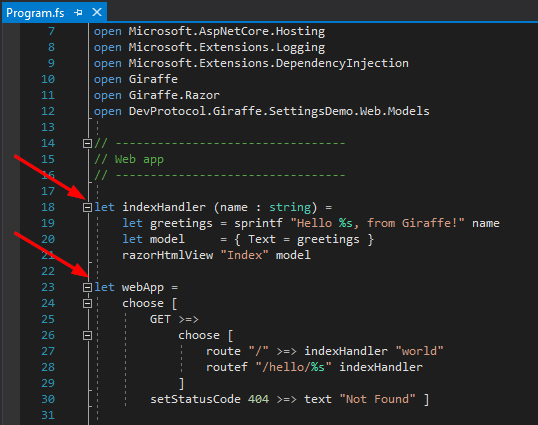
- Add a file Routing.fs above Program.fs
- Add HttpHandler.fs above Routing.fs
Note: If you’re using Visual Studio 2017 you can move the files up and down via ALT+arrow
Add routes
Add a default route in your Routing.fs file
module DevProtocol.Giraffe.SettingsDemo.Web.Routing

open Giraffe
open DevProtocol.Giraffe.SettingsDemo.Web.HttpHandlers

let routes: HttpFunc -> HttpFunc =
    choose [
        GET >=>
            choose [
                route "/" >=> indexHandler
            ]
        setStatusCode 404 >=> text "Not Found" ]
The configuration of the routes is nearly identical to the route configuration of Suave (another popular F# web framework).
Add a httpHandler
In the HttpHandler.fs file we need to define the indexHandler:
module DevProtocol.Giraffe.SettingsDemo.Web.HttpHandlers

open Microsoft.AspNetCore.Http
open Microsoft.Extensions.Configuration
open Giraffe
open Giraffe.Razor
open DevProtocol.Giraffe.SettingsDemo.Web.Models