

Java 8 introduced the Stream API to simplify data processing using a functional programming approach. It provides a clean and concise way to perform operations on collections, making code more readable and easier to maintain.
- It supports operations like filtering, mapping, sorting, reducing, and collecting elements.
- Stream operations can be chained together to create efficient and expressive data-processing pipelines.
- Streams can process data sequentially or in parallel to improve performance for suitable workloads.
A Stream is a sequence of elements that supports functional-style operations. Unlike Collections, a Stream does not store data it only processes it.
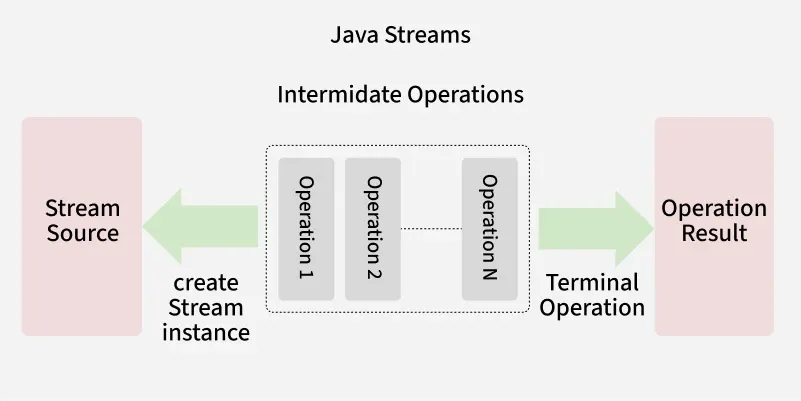
Features of Streams
Java Streams offer several powerful features that make collection processing easier and more efficient.
- Declarative Programming: Write concise and expressive code instead of explicit loops.
- Lazy Evaluation: Intermediate operations execute only when a terminal operation is invoked.
- Pipeline Processing: Multiple operations can be chained together.
- Parallel Processing: Supports multi-core processors using parallel streams.
- No Data Storage: Streams process data without storing it.
- Functional Programming: Supports lambda expressions and method references.
Internal Working of a Stream
Every stream follows a three-step processing pipeline.
Step 1: Create a Stream
Create a stream from a collection, array, file, or other data source.
Step 2: Apply Intermediate Operations
Transform or filter the data using operations such as:
- filter()
- map()
- sorted()
These operations are lazy, meaning they are not executed immediately.
Step 3: Apply a Terminal Operation
The terminal operation triggers the execution of the pipeline and produces the final result.
Examples include:
- collect()
- forEach()
- count()
Creation of Streams
Streams Creation can be done by multiple ways:
- From a Collection: Create a stream directly from a List, Set or any Collection using stream()
- From an Array: Use Arrays.stream(array) to convert an array into a stream.
- Using Stream.of(): Create a stream from a fixed set of values using Stream.of().
- Infinite Stream: Generate an unbounded sequence using Stream.iterate() or Stream.generate()
Example
import java.util.*;
import java.util.stream.*;

public class StreamCreation {
    public static void main(String[] args) {
        // 1. From a Collection
        List<String> list = Arrays.asList("Java", "Python", "C++");
        Stream<String> stream1 = list.stream();

        // 2. From an Array
        String[] arr = {"A", "B", "C"};
        Stream<String> stream2 = Arrays.stream(arr);

        // 3. Using Stream.of()
        Stream<Integer> stream3 = Stream.of(1, 2, 3, 4, 5);

        // 4. Infinite Stream (limit to avoid infinite loop)
        Stream<Integer> stream4 = Stream.iterate(1, n -> n + 1).limit(5);
        stream4.forEach(System.out::println);
    }
}
Output
1
2
3
4
5
Stream Pipeline
A Stream Pipeline is a sequence of operations performed on a stream to process data efficiently. It consists of a data source, one or more intermediate operations, and a terminal operation that produces the final result.
- Intermediate operations (such as filter(), map(), and sorted()) are lazy and execute only when a terminal operation is invoked.
- A pipeline processes elements in a streamlined manner, allowing multiple operations to be combined into a single flow.
A Stream Pipeline defines how data flows through different stages. It has three parts:
1. Source
The source provides the data for the stream. It can be a collection, array, file or even an infinite generator.
Example:
List<Integer> numbers = Arrays.asList(10, 20, 30, 40);
Stream<Integer> stream = numbers.stream(); // Source
2. Intermediate Operations
Intermediate operations transform a stream into another stream. Some common intermediate operations include:
- filter(): Filters elements based on a specified condition.
- map(): Transforms each element in a stream to another value.
- Sorted(): Sorts the elements of a stream.
- Distinct(): Remove duplicates.
- Skip(): Skip first n elements.
Example:
import java.util.*;
import java.util.stream.*;

public class StreamIntermediate {
    public static void main(String[] args) {
        List<Integer> numbers = Arrays.asList(5, 10, 20, 10, 30, 40);

        numbers.stream()
               .filter(n -> n > 10)   // keep > 10
               .map(n -> n * 2)       // double them
               .distinct()            // remove duplicates
               .sorted()              // sort ascending
               .forEach(System.out::println);
    }
}
Output
40
60
80
3. Terminal Operations
Terminal Operations are the operations that on execution return a final result as an absolute value.
- ForEach(): It iterates all the elements in a stream.
- collect(Collectors.toList()): It collects stream elements into a list (or other collections like set/map).
- Reduce(): It reduces stream elements into a single aggregated result.
- count(): It returns the total number of elements in a stream.
- anyMatch() / allMatch() / noneMatch(): They check whether elements match a given condition.
- findFirst() / findAny(): They return the first or any element from a stream.
Example:
import java.util.*;
import java.util.stream.*;

public class StreamTerminal {
    public static void main(String[] args)
    {
        List<String> names = Arrays.asList("Amit", "Riya", "Rohan", "Amit");

        // Collect into Set (removes duplicates)
        Set<String> uniqueNames = names.stream().collect(Collectors.toSet());
        System.out.println(uniqueNames);

        // Count names starting with 'R'
        long count = names.stream().filter(n -> n.startsWith("R")).count();
        System.out.println("Names starting with R: " + count);

        // Reduce (concatenate names)
        String result = names.stream().reduce("", (a, b) -> a + b + " ");
        System.out.println(result);
    }
}
Output
[Amit, Riya, Rohan]
Names starting with R: 2
Amit Riya Rohan Amit
Types of Streams
Streams can be categorized into different types based on their nature and usage.
1. Sequential Stream
- Processes elements one by one in a single thread.
- Created by default when you call stream().
Example:
import java.util.*;
public class SequentialStreamDemo {
    public static void main(String[] args) {
        List<String> names = Arrays.asList("A", "B", "C", "D");

        names.stream()
             .forEach(System.out::println); // Executes sequentially
    }
}
Output
A
B
C
D
2. Parallel Streams
Parallel Streams are the type of streams that can perform operations concurrently on multiple threads. These Streams are meant to make use of multiple processors or cores available to speed us the processing speed. There are two methods to create parallel streams are mentioned below:
- Using the parallel() method on a stream
- Using parallelStream() on a Collection
Example:
import java.util.*;
import java.util.stream.*;

public class ParallelStreamDemo {
    public static void main(String[] args) {
        List<Integer> numbers = Arrays.asList(1,2,3,4,5,6,7,8,9);

        numbers.parallelStream().forEach(n -> System.out.println(n + " " + Thread.currentThread().getName()));
    }
}
Output
2 ForkJoinPool.commonPool-worker-3
1 ForkJoinPool.commonPool-worker-3
4 ForkJoinPool.commonPool-worker-3
5 ForkJoinPool.commonPool-worker-3
7 ForkJoinPool.commonPool-worker-3
6 main
8 ForkJoinPool.com...
3. Infinite Streams
Streams can also generate unbounded sequences. Use limit() to avoid infinite execution.
Example:
import java.util.stream.*;

public class InfiniteStreamDemo {
    public static void main(String[] args) {
        Stream.iterate(1, n -> n + 1)
              .limit(5)
              .forEach(System.out::println);
    }
}
Output
1
2
3
4
5
4. Primitive Streams
Java provides specialized streams for primitive data types:
- IntStream -> for int values
- LongStream -> for long values
- DoubleStream -> for double values
Example:
import java.util.stream.IntStream;

public class PrimitiveStreamDemo {
    public static void main(String[] args) {
        IntStream.range(1, 5).forEach(System.out::println);
    }
}
Output
1
2
3
4
Stream vs Collection difference
- Collection stores data in memory and represents a data structure (e.g., List, Set, Map).
- Stream does not store data; it processes data from a source (like a collection) in a functional, declarative way.
To know more about Stream vs Collection refer-> Stream vs Collection
Java Stream: File Operation
In this section, we see how to utilize Java stream in file I/O operation.
1. File Read Operation
Let's understand file read operation through the given example
import java.io.IOException;
import java.nio.file.Files;
import java.nio.file.Paths;
import java.util.List;
import java.util.stream.Collectors;
import java.util.stream.Stream;

class GFG {
    // Method to filter strings of a given length and convert them to uppercase
    private static List<String>
    filterAndConvertToUpper(Stream<String> stream, int length)
    {
        return stream.filter(s -> s.length() == length)
            .map(String::toUpperCase)
            .collect(Collectors.toList());
    }

    public static void main(String[] args)
    {
        // Replace with the actual file path